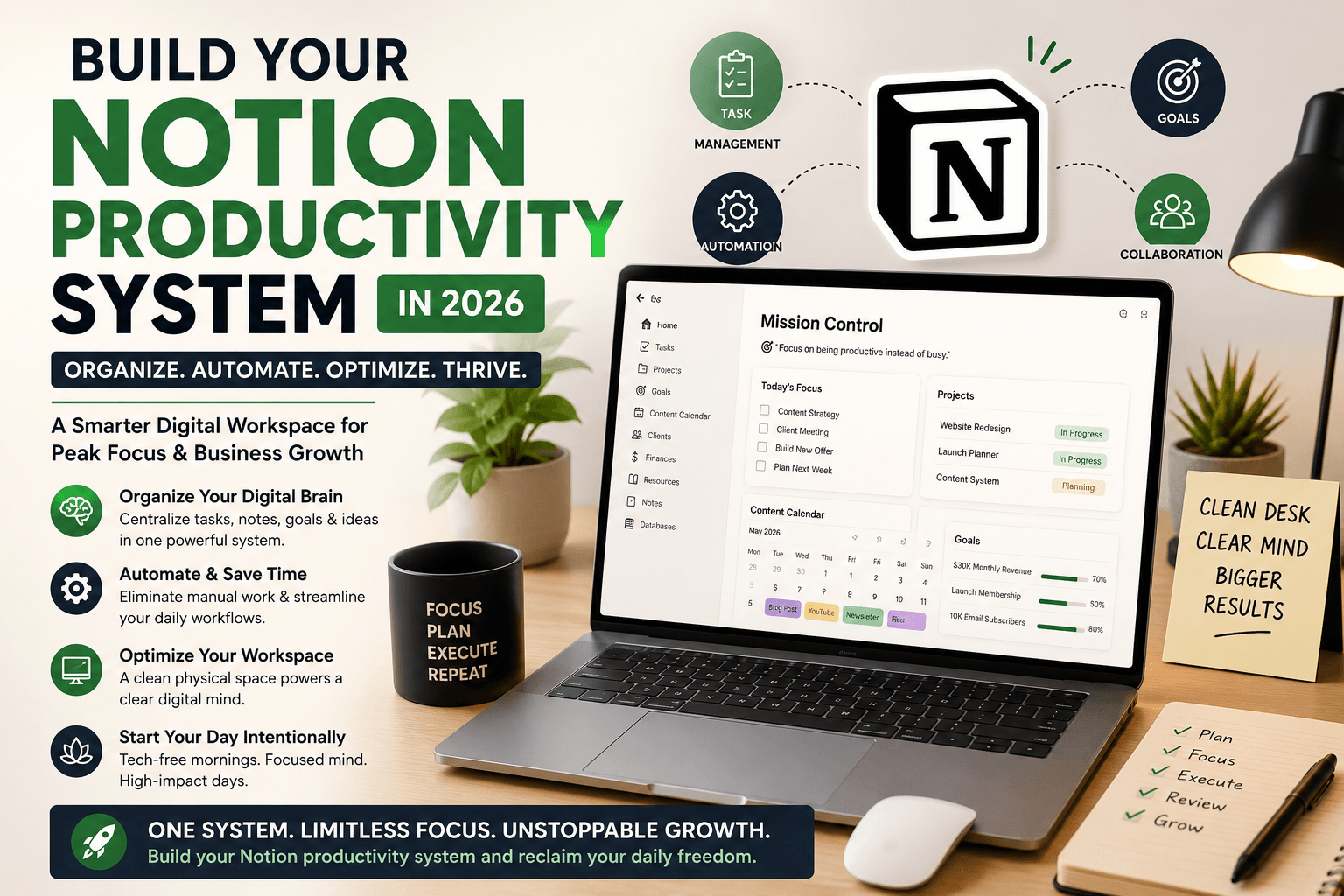
Brian Tracy once famously said, ‘Clear thinking requires a clear desk.’ But in 2026, your desk isn’t just physical—it is digital. If your desktop is cluttered and your notes are scattered, your focus will inevitably fade. To conquer digital burnout, you need to build a structured Notion productivity system to organize your digital brain. By setting up a centralized workspace, you can easily identify your most important tasks, eliminate daily friction, and finally streamline your business workflow for peak efficiency.
According to top productivity experts, workspace organization directly impacts your mental clarity. When your files, strategies, and daily checklists are scattered across ten different apps, your brain wastes valuable energy just searching for information rather than executing tasks. Implementing a comprehensive Notion productivity system solves this problem by bringing all your business assets under one roof. Let’s look at how a single, optimized digital setup can transform your business growth vibe and skyrocket your daily output.
“Implementing a comprehensive Notion productivity system solves this problem by bringing all your business assets under one roof. (If you want to completely disconnect before building this system, check out our ultimate guide on Digital Detox Strategies for Entrepreneurs).”
1. Organize Your Digital Brain with a Custom Notion Setup
The core of any successful Notion productivity system is a clean, centralized digital workspace. Instead of letting brilliant ideas slip away in scattered notebooks, you need a single source of truth for your business operations. When everything lives in one dedicated place, execution becomes effortless.
- Centralized Task Management & Content Framework: Instead of jumping between multiple apps, a master Notion productivity system dashboard allows you to keep your content calendars, revenue goals, client projects, and daily checklists in one view. Seeing how your micro-tasks connect to your macro-goals keeps you aligned with your core business strategy.
- Eliminate Mental Clutter via Brain Dumping: Human brains are great for having ideas, but terrible at holding them. Offloading your random thoughts, urgent reminders, and long-term plans into a highly organized Notion productivity system instantly frees up cognitive bandwidth. This mental space is exactly what you need for deep, big-picture planning and creative breakthroughs.
- Customization for Your Unique Workflow: Pre-made, rigid software forces you to change how you work. The beauty of tailoring a Notion productivity system is that it adapts entirely to your specific daily routine, energy levels, and operational style. A system that mirrors your thought process is a system you will actually stick to long-term.
- Seamless Collaboration and Scalability: As your business grows, sharing a messy workspace creates confusion. A structured framework inside your Notion productivity system allows you to easily onboard virtual assistants, freelancers, or team members, giving them instant clarity on ongoing tasks without wasting hours in back-and-forth communication.
2. Streamline Daily Workflow with Business Automation
Once your digital brain is organized, the next crucial step in your Notion productivity system is removing repetitive, manual tasks from your schedule to drastically boost business efficiency. Having a beautiful dashboard is useless if you are still losing 3 hours a day doing basic administrative data entry. By connecting your workspace with modern automation workflows, you bridge the gap between planning and execution.
- Automate Routine Tasks & Data Syncing: Manually copying data from your emails, social media leads, or payment gateways into your workspace drains your daily energy. Advanced automation tools can auto-sort client emails, sync project tracking spreadsheets, and push external data directly into your dashboard. Integrating these workflows into your Notion productivity system saves hours of manual grunt work every single week.
- Maintain Deep Focus on High-Value Assets: When automated systems handle the background operations within your Notion productivity system—like sending follow-up reminders or updating content statuses—your mind is protected from constant interruptions. This allows you to enter a state of deep focus, giving you the cognitive space to work entirely on high-value creative projects, business scaling, and strategic partnerships.
- Drastically Reduce Human Error and Oversight: Let’s face it, when you are tired, you forget things. You might miss a client follow-up or forget to check off a task. Connecting automated workflows to your Notion productivity system ensures that minor administrative details never slip through the cracks. Systems don’t get tired; they execute perfectly every time, ensuring your client management remains professional and flawless.
- Maximize Scalability for Business Growth: A manual workflow breaks the moment your client load doubles. By establishing automation early within your Notion productivity system, you build a scalable foundation. Your backend systems can handle an influx of new business effortlessly, allowing you to grow your brand without burning out your personal energy.
3. Optimize Your Physical Workspace Environment
A high-performing Notion productivity system works best when your physical environment matches your digital clarity. Clutter on your real desk causes instant clutter in your mind, breaking your focus before you even begin. Environmental psychology shows that physical mess constantly drains your subconscious attention. To truly unlock the power of your digital dashboard, you must optimize your physical surroundings to create a high-focus zone.
- Enforce a Strict Clean Desk Policy: Your desk should only be reserved for active execution, not storage. Keep absolutely essential tools—like your laptop, a single notebook, and a bottle of water—on your workspace table. Removing non-essential items ensures that when you look down, your eyes aren’t catching distracting objects, allowing you to align your physical actions seamlessly with your Notion productivity system.
- Drastically Reduce Visual Distractions & Cable Mess: Hiding messy charging wires, stray receipts, and random stacks of paper does wonders for your brain. Studies prove that visual clutter triggers cortisol (the stress hormone), which induces anxiety. Clearing these distractions allows you to open your Notion productivity system with a calm mind, making it significantly easier to sit down and do deep work.
- Boost Physical Energy & Workflow Momentum: An organized, aesthetically pleasing physical setup creates a positive psychological anchor. When your desk looks clean, professional, and inviting, it sparks an internal desire to sit down, launch your Notion productivity system, and dominate your daily workflow. This friction-free transition from arriving at your desk to entering “the zone” is crucial for maintaining daily business momentum.
- Create Ergonomic Alignment for Longevity:Productivity isn’t just mental; it’s physical. Setting up your monitor at eye level using a premium Amazon laptop riser, using a supportive chair, and keeping your most-used tools within arm’s reach prevents physical fatigue. When your body is comfortable, your mind can stay immersed in your Notion productivity system for longer periods without tracking aches or low energy levels.
4. Establish a Tech-Free Morning Routine
How you start your morning heavily determines the ultimate success and output of your entire day.
(To understand how your routine habits impact your long-term success, read about The Blueprint of Success on our blog).” Checking your smartphone immediately upon waking shatters your cognitive focus before your Notion productivity system even gets a chance to guide your daily tasks. By floods of notifications and notifications-driven dopamine hits, you destroy your brain’s deep-work capacity for the rest of the day. To counter this, building a tech-free boundary in the morning is essential.
- Enforce a Strict ‘No Phones’ Rule for the First Hour: Dedicate the very first 60 minutes of your morning to mindful thinking, light exercise, journaling, or quiet goal setting rather than infinite scrolling. Guarding this early morning window ensures that your brain transitions naturally from sleep to high-focus alertness, allowing you to approach your digital workspace with absolute clarity later on.
- Prevent Defensively Reactive Thinking Patterns: Reading emails, checking site metrics, or looking at client messages the second you open your eyes immediately puts your brain in a defensive, highly stressful state. Instead of driving your day based on your own business strategy, you spend your energy reacting to other people’s demands. True leaders control their morning agenda before entering the digital grid.
- Wake Up Intentional and Mentally Prepared: Use this quiet, analog time to mentally or physically review your primary goals for the day. When you spend your morning anchoring your mind on your big-picture vision, you build massive intentionality. This mental alignment makes you incredibly sharp and targeted the moment you finally log into your Notion productivity system to execute your daily checklist.
- Protect Daily Dopamine Levels for Deep Work: When you skip the morning screen routine, you save your brain’s dopamine reserves for meaningful, creative business tasks. Instead of getting cheap dopamine from social media feeds, your brain becomes wired to seek satisfaction from checking off high-impact milestones inside your centralized operational dashboard.
Conclusion: Reclaim Your Daily Freedom
Building a robust Notion productivity system is not about adding more work to your day; it is about creating a system that gives you your time back. By organizing your digital assets, automating manual tasks, and keeping your physical workspace clean, you protect your mental clarity and prevent entrepreneurial burnout.
Remember, true business growth only happens when your mind is calm, structured, and targeted on what truly matters. Take control of your workflow today, clean up your digital space, and let your unique growth vibe transform your business trajectory!
Are you ready to optimize your digital workspace? Subscribe to our newsletter today for more exclusive tips on digital wellness and business efficiency for modern leaders!
Frequently Asked Questions (FAQs)
Q1: What is a Notion productivity system?
Ans: A Notion productivity system is a customized, centralized digital workspace designed to manage your business operations, content calendars, daily checklists, and long-term goals in one single application. Unlike traditional rigid apps, it acts as an organized digital brain that completely adapts to your unique workflow and prevents mental burnout.
Q2: How do I organize my digital brain for business efficiency?
Ans: To organize your digital brain, you need to eliminate app fatigue by moving all your tasks, notes, and strategies into a unified dashboard. By setting up master databases, daily focus views, and clear visual categories, you stop wasting mental energy searching for files and streamline your daily business workflow.
Q3: Can a Notion template help prevent entrepreneurial burnout?
Ans: Yes, absolutely. Entrepreneurial burnout usually happens due to cognitive overload and scattered information. When you offload your ideas and tracking systems into a structured dashboard, you clear mental friction, reduce anxiety, and gain absolute clarity on your high-priority business tasks.
Q4: Is Notion better than other task management tools?
Ans: Notion stands out because of its absolute flexibility and modular customization. While tools like Trello or Asana force you into a pre-made layout, a personalized setup lets you build custom relational databases and custom views that precisely fit your lifestyle, business scaling needs, and energy levels.
Q5: Should I build my workspace framework from scratch or hire an expert?
Ans:If you love tweaking layouts, you can build it yourself. However, if you want to save time and ensure your backend workflow is seamless and error-free, hiring a certified custom Notion template expert on Fiverr is highly recommended. It allows you to get a premium operational dashboard tailored exactly to your business without any setup stress.