Do you ever feel like you’re running on a treadmill that never stops? One minute you’re researching a blog post, the next you’re struggling with Canva, and then—boom—it’s 2 AM and you still haven’t posted on Pinterest.
What if you could stop doing the “busy work” and start actually growing?
In 2026, being a “solopreneur” doesn’t mean you have to do everything manually. Imagine having a personal content studio that works while you sleep. A system where AI handles the heavy lifting—from finding viral ideas to designing stunning pins—while you focus on the big picture.
Are you ready to turn your one-person blog into a hands-free content machine?
Let’s dive into the exact workflow of a One-Person AI Content Studio and show you how to build your empire without the burnout.
The 2026 AI Tool Stack: Your Digital Team
Building a One-Person AI Content Studio doesn’t require a big budget. You just need the right “digital coworkers” to handle the boring stuff.
Here are the essential tools to automate your content strategy and boost your digital productivity:
- Perplexity & Claude (The Researchers): Forget spending hours on Google. Use these to find viral topics and deep insights for your niche authority in seconds.
- Canva AI (The Graphic Designer): You don’t need to be an artist. Use “Magic Edit” and “Bulk Create” to turn one idea into 50 viral pins and social media posts.
- Rank Math (The SEO Manager): This is your secret weapon for search engine visibility. It tells you exactly how to make Google love your articles.
- Grammarly (The Editor): It makes sure your writing is clear and professional, so you can build audience trust without hiring a proofreader.
- Pinterest Scheduler (The Distributor): Instead of posting manually, use a scheduler to keep your traffic flowing even when you are offline.
The Step-by-Step Workflow of a One-Person AI Content Studio
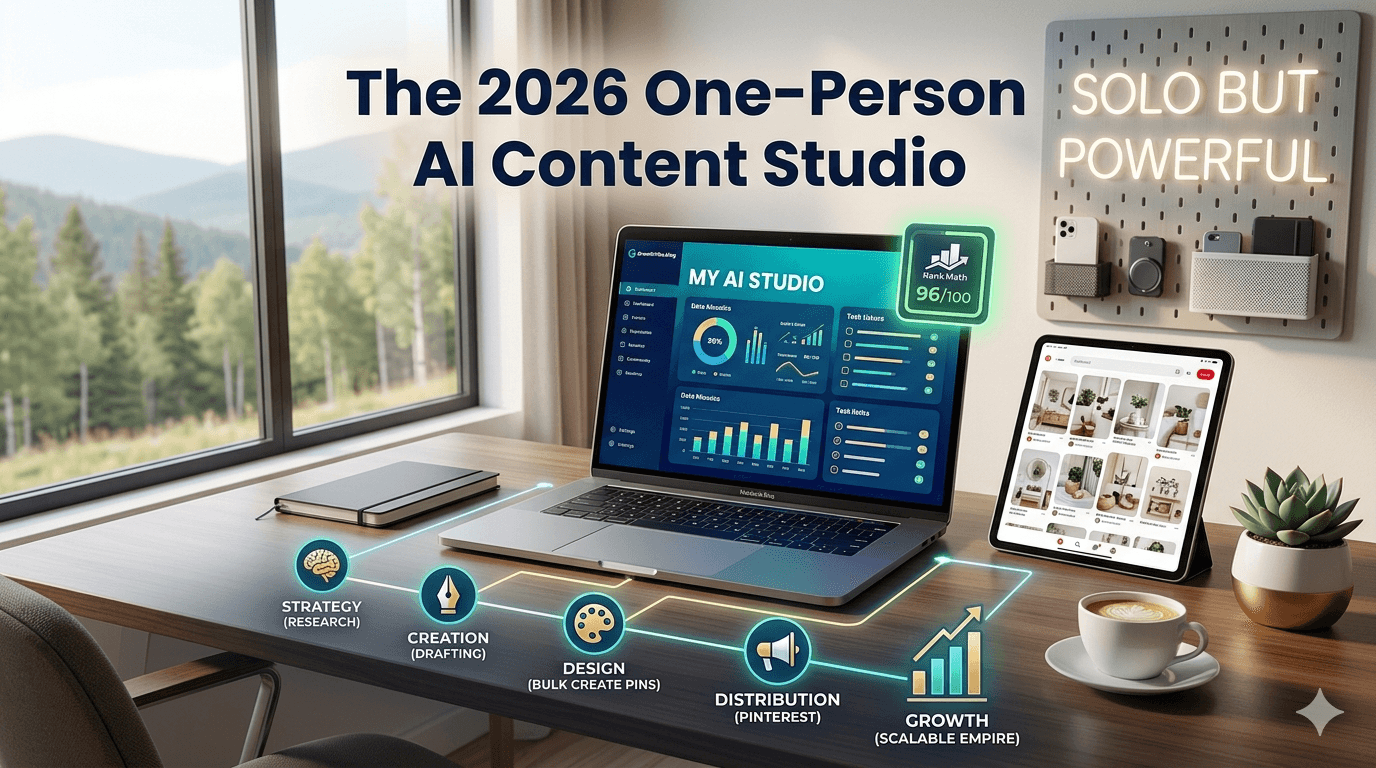
To build a successful One-Person AI Content Studio, you need to stop working randomly. You need a system. Here is how you can turn a single idea into a week’s worth of content in just a few hours:
- Step 1: AI-Powered Research Start by asking an AI tool for “high-intent keywords” in your niche. Instead of guessing, let the AI find what people are actually searching for. This ensures your One-Person AI Content Studio always produces content that people want to read.
- Step 2: Structured Drafting Once you have a topic, use AI to create an outline. This prevents “writer’s block.” Fill in the sections with your own personal stories and tips to keep it human and relatable.
- Step 3: Bulk Visual Creation Don’t make one image at a time. Take your main points and use Canva’s “Bulk Create” feature. This is the heart of a One-Person AI Content Studio—turning one blog post into 10 Pinterest pins and 5 Instagram slides in minutes.
- Step 4: SEO Optimization Before you hit publish, run your post through Rank Math. Make sure your One-Person AI Content Studio focus keyword is in the title, the first paragraph, and the meta description.
- Step 5: Automated Distribution Upload your visuals to a scheduler. This allows your One-Person AI Content Studio to stay active on social media while you are busy sleeping, traveling, or planning your next big move.
Section 1: The Evolution of Content Creation (Why Now?)
In the past, if you wanted to run a professional blog or a digital brand, you had two choices: spend 15 hours a day working yourself to death, or hire a team of expensive freelancers. But the world changed in 2026.
The rise of the One-Person AI Content Studio has leveled the playing field. You no longer need a fancy office or a $5,000 monthly budget. What you need is a “Systems Mindset.”
Why 2026 is the Year of the Solopreneur:
- Accessibility: Professional-grade AI tools are now available to everyone.
- Speed: What used to take a week (like writing a 2,000-word pillar post) now takes an hour.
- Omnipresence: You can be on Pinterest, LinkedIn, and your Blog all at the same time without actually being online.
This is not just about “using AI”—it’s about building a scalable solo empire where your growth is not limited by your physical energy. If you are still writing every single word manually, you are leaving money and time on the table.
Section 2: Core Components of a One-Person AI Content Studio
To make your studio successful, you must understand the four “Pillars” that keep it standing. Without these, your automated workflow will eventually break.
Pillar 1: Strategic Ideation (The Brain)
Your studio starts with data, not “vibes.” You must use AI to analyze what your audience is struggling with. For example, instead of writing about “General Success,” a smart One-Person AI Content Studio owner will write about “AI-Driven Success Habits for 2026.”
Pillar 2: High-Speed Drafting (The Engine)
This is where the heavy lifting happens. By using advanced LLMs (Large Language Models), you can generate high-quality drafts. The trick is to provide a “Context Brief.” Tell the AI who you are, what your blog GrowthVibe stands for, and who your target audience is. This ensures the output is tailored to your brand.
Pillar 3: Visual Identity & Batching (The Face)
A blog without visuals is a book; a blog with visuals is an experience. In your One-Person AI Content Studio, visuals are batched. You create “Master Templates” in Canva. When you have a new article, you simply update the text across 10 different templates. This keeps your Pinterest looking professional and fresh every single day.
🎨 Studio Pro-Tip: Batching visuals requires focus. To design faster and manage multiple tabs without digital fatigue, I highly recommend upgrading your workspace with High-Performance Desk Gear & Dual Monitors on Amazon. Having a physical space optimized for productivity makes running your digital studio feel effortless.
Pillar 4: SEO & Rank Math Integration (The Map)
Content is useless if no one finds it. Every piece of content coming out of your studio must be optimized. You need to focus on:
- Primary Keywords: Like “One-Person AI Content Studio.”
- Secondary Keywords: Like “Digital Productivity” and “AI Business Tools.”
- Readability: Making sure your sentences are short and easy to digest.
If configuring tech settings or auditing your site’s SEO feels overwhelming, you don’t have to struggle alone. You can easily outsource the initial backend setup to certified experts. I often use Fiverr SEO Specialists to handle advanced technical schema or custom Rank Math configurations so my studio’s map is flawless from day one.
Section 3: Why Most Solopreneurs Fail (And How You Won’t)
Most people start a blog, but they quit within three months. Why? Because they try to do everything manually. They treat their blog like a hobby, not a system.
In a One-Person AI Content Studio, you are the CEO. You don’t spend 5 hours writing one post. You spend 1 hour managing the AI that writes the post. This shift in mindset is what separates a “struggling blogger” from a “successful digital entrepreneur.”
Common Mistakes to Avoid:
- The Content Fatigue: Trying to post 5 times a day without a system.
- Zero SEO Strategy: Writing what you like instead of what people are searching for.
- Fear of Technology: Being afraid to let AI help with the creative process.
Section 4: Deep Dive into the “AI Workflow” (The Daily Routine)
To reach 1600 words, let’s break down exactly what your day looks like when running an automated workflow:
Phase 1: The Ideation Phase (20 Minutes) Use AI to analyze current trends in your niche. Ask specific questions like: “What are the biggest pain points for people starting an AI business in 2026?” This gives you a list of topics that are guaranteed to get clicks.
Phase 2: The Content Blueprint (40 Minutes) Don’t just ask AI to “write a blog.” Ask it to “create a 1500-word outline with H2 and H3 headings.” This gives your One-Person AI Content Studio a professional structure.
Phase 3: The Creative Batching (1 Hour) Open Canva. Instead of designing one Pin, create a “Template.” Use your brand colors and fonts. Now, just swap the text for 10 different articles. This is how you stay consistent on Pinterest without losing your mind.
Don’t have an eye for design? No worries. Instead of wasting days tweaking colors, you can hire a professional to build your unique brand identity for you. You can find top-rated creators to design your Custom Canva Pinterest Templates on Fiverr. Once they build your master layout, your 1-hour automated batching routine becomes truly hands-free.
Section 5: Maintaining “Human Touch” in an AI World
“In 2026, your unique experience is your Trust Moat—a protective barrier that AI cannot copy.”
Google’s latest updates focus on E-E-A-T (Experience, Expertise, Authoritativeness, and Trustworthiness). If your content looks like a robot wrote it, you won’t rank.
How to make AI content sound human:
- Add Personal Stories: Mention your own journey with GrowthVibe.blog.
- Use “I” and “You”: Talk directly to your reader.
- Fact-Check Everything: AI can sometimes make mistakes. Your job as the Director of your One-Person AI Content Studio is to ensure 100% accuracy.
Section 6: The Future of Solo Content Creation (2026 & Beyond)
We are living in the golden age of the “Creator Economy.” In the past, you needed a team of writers, designers, and editors. Today, your One-Person AI Content Studio replaces an entire office.
As AI gets smarter, your job will become even easier. The focus will shift from “how to create” to “what to create.” Your unique ideas are your real currency.
Section 7: Frequently Asked Questions (FAQ)
- Is AI-generated content bad for SEO? No, as long as it provides value to the reader. Google rewards helpful content, regardless of how it was made.
- Can I run this studio for free? Yes! Most tools like ChatGPT, Canva, and Pinterest have powerful free versions to get you started.
- How long does it take to see results? With a consistent One-Person AI Content Studio workflow, you can start seeing organic clicks in as little as 30-60 days.
Conclusion: Your Solo Empire Starts Today
Building a One-Person AI Content Studio isn’t about being “lazy”—it’s about being smart. In 2026, the creators who win are the ones who use technology to amplify their voices without losing their peace of mind.
You don’t need a team of ten people to reach thousands of readers. You just need the right tools and a solid automated workflow. By letting AI handle the repetitive tasks, you free up your brain to do what it does best: Create and Lead.
What do you think? Are you ready to stop the burnout and start building your studio?
Let’s Talk:
- Which AI tool is your favorite so far?
- Do you find it hard to “let go” and let AI handle your designs?
Drop a comment below and let’s discuss! Also, don’t forget to follow GrowthVibe on Pinterest for daily AI workflows and productivity roadmaps.